AIRS Python SDK
Turn the framework into running code.
Purpose
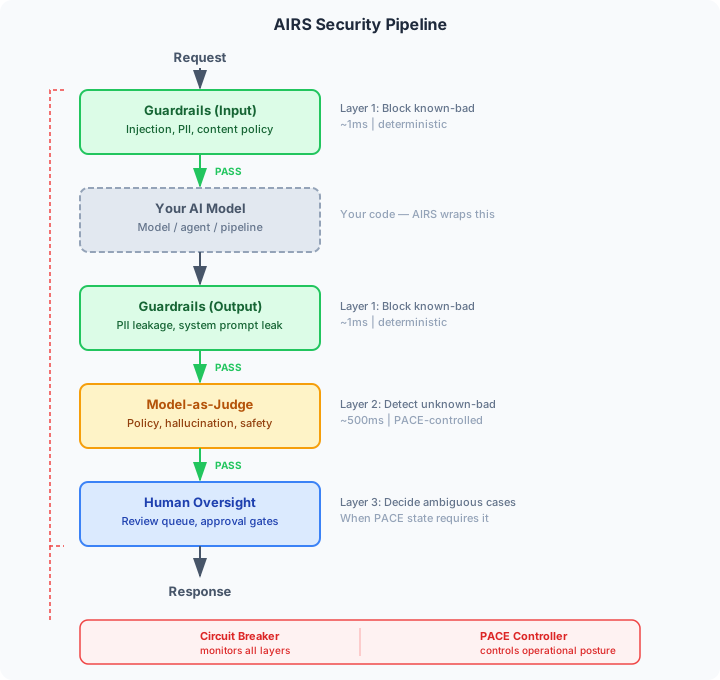
The AIRS Python SDK exists to help teams think about AI runtime security before they ship. It implements the three-layer security architecture from the AIRS framework as a drop-in Python library, giving you a concrete starting point for understanding where your AI deployment's risks are and what controls you should consider.
The SDK is not a finished product. It is a working reference implementation, a mechanism to explore risk classification, guardrail design, judge evaluation, and structured degradation in the context of your deployment. By answering the assessment questionnaire and running the test scenarios, you build a mental model of what threats you face and what security layers need to exist, even if the specific guardrails and patterns in this SDK are not the ones you ultimately deploy.
Like the framework itself, the SDK is designed to be risk-proportionate: use the components you need for your risk tier, leave out the ones you do not.
Early-stage SDK, not for production assurance
The examples, test scenarios, and guardrail patterns included in this SDK are limited and illustrative. They demonstrate the shape of a security layer, not the depth required for a real, production AI solution. Do not rely on the current examples to assess or protect a production system.
As the SDK matures, more examples aligned to specific use cases, industries, and threat models will be added. For now, treat this as a starting point for your own implementation, not a substitute for it.
Bring Your Own Model
The SDK is model-agnostic. It does not call AI models for you. It wraps security controls around your existing model calls. You continue using whatever model, provider, or framework you already have:
# 1. AIRS checks the input
input_result = await pipeline.evaluate_input(request)

# 2. You call YOUR model - OpenAI, Anthropic, Bedrock, Ollama, local, anything
ai_output = await your_model(request.input_text)

# 3. AIRS checks the output
output_result = await pipeline.evaluate_output(request, response)
AIRS only sees the text going in and the text coming out. It doesn't know or care which model you're using, how you're calling it, or what framework it runs on. This means it works with:
- Any model provider: OpenAI, Anthropic, Google, Mistral, Cohere, local models
- Any framework: LangChain, LlamaIndex, Haystack, raw API calls
- Any architecture: single model, RAG, agents, multi-agent orchestration
The one exception is the optional Model-as-Judge, which does call an OpenAI-compatible API to evaluate outputs. This is the judge model, a separate, independent model used for security evaluation, not your production model.
What It Provides
| Component | What It Does |
|---|---|
| Guardrails | Regex-based prompt injection detection, PII filtering, content policy (extensible) |
| Model-as-Judge | Rule-based (no API key) or LLM-based (OpenAI-compatible) output evaluation |
| Circuit Breaker | Sliding-window failure tracking, auto-trip, manual emergency stop, recovery |
| PACE Controller | State machine for structured degradation (Primary → Alternate → Contingency → Emergency) |
| Security Pipeline | Orchestrates all layers with configurable behavior per PACE state |
| Agent Security | Identity propagation, delegation depth enforcement, cycle detection, scope narrowing |
| Tool Policy Engine | Tool-call → policy → allow/deny. Deny-list, allow-list, per-agent-type restrictions |
| Telemetry & Audit | Structured security events with correlation IDs, pluggable audit sinks for SOC integration |
| CLI Assessment | Interactive tool that classifies your deployment and recommends controls |
| FastAPI Middleware | Drop-in middleware that protects AI endpoints automatically |
Install
pip install airs
That's it. You now have the core SDK (guardrails, circuit breaker, PACE, telemetry) and the airs CLI.
Optional extras
# With FastAPI middleware
pip install "airs[fastapi]"

# With Model-as-Judge (requires OpenAI-compatible API)
pip install "airs[judge]"

# Everything (includes all provider packages)
pip install "airs[all]"
Model provider packages (BYOK)
To run airs assess with --provider, you need the provider's Python package installed. AIRS does not bundle these. Bring your own key, bring your own package:
# For OpenAI models (gpt-4o, gpt-4-turbo, etc.)
pip install openai

# For Anthropic models (Claude Sonnet, Opus, Haiku, etc.)
pip install anthropic

# Both providers
pip install openai anthropic
You also need an API key from your provider:
| Provider | Package | API Key Env Var | Get a Key |
|---|---|---|---|
| OpenAI | openai |
OPENAI_API_KEY |
platform.openai.com/api-keys |
| Anthropic | anthropic |
ANTHROPIC_API_KEY |
console.anthropic.com/settings/keys |
Set your key for the session:
# OpenAI
export OPENAI_API_KEY=sk-your-key-here

# Anthropic
export ANTHROPIC_API_KEY=sk-ant-your-key-here
Then run:
airs assess --provider openai --model gpt-4o
airs assess --provider anthropic --model claude-sonnet-4-20250514
Missing provider package?
If you see openai package not installed or anthropic package not installed, install the relevant package above. The core pip install airs intentionally keeps these optional so you only install what you use.
Verify it works
# Check version
airs version

# Run the interactive assessment
airs assess

# Machine-readable output
airs assess --json --non-interactive
No external dependencies for core
The core SDK (guardrails, circuit breaker, PACE) requires only pydantic, rich, and typer. No API keys or external services needed to get started.
Install from source
If you prefer to install from source:
git clone https://github.com/JonathanCGill/airuntimesecurity.io.git
cd airuntimesecurity.io
pip install ".[all,dev]"
5-Minute Quick Start
import asyncio
from airs.core.models import AIRequest, AIResponse
from airs.runtime import (
    SecurityPipeline, GuardrailChain, RegexGuardrail,
    CircuitBreaker, PACEController,
)

async def main():
    # Build the pipeline
    pipeline = SecurityPipeline(
        guardrails=GuardrailChain([RegexGuardrail()]),
        circuit_breaker=CircuitBreaker(),
        pace=PACEController(),
    )

    # Evaluate input before calling your model
    request = AIRequest(input_text="What is the capital of France?")
    input_result = await pipeline.evaluate_input(request)

    if not input_result.allowed:
        print(f"Blocked: {input_result.blocked_by}")
        return

    # Call your AI model (replace with your actual model call)
    ai_output = "The capital of France is Paris."

    # Evaluate output before returning to user
    response = AIResponse(request_id=request.request_id, output_text=ai_output)
    output_result = await pipeline.evaluate_output(request, response)

    if output_result.allowed:
        print(ai_output)
    else:
        print(f"Response blocked: {output_result.blocked_by}")

asyncio.run(main())
Model Integration
The SDK is model-agnostic. It wraps security controls around your existing model calls. The quick start above uses a hardcoded string in place of a real model. To test against a live model, use the CLI:
# Test guardrails against a live model
airs assess --provider openai --model gpt-4o --non-interactive

# Test guardrails + Model-as-Judge (catches what guardrails miss)
airs assess --provider anthropic --model claude-sonnet-4-20250514 --judge-model gpt-4o-mini --non-interactive
This sends test prompts through the full AIRS pipeline against a live model and shows what gets blocked. Adding --judge-model enables Layer 2 evaluation, an independent model that catches subtle issues like hallucinations, medical advice without disclaimers, and synthetic PII that regex guardrails won't flag. See Live model testing below for details on API keys and costs.
CLI Assessment
Classify your deployment and get a prioritized implementation plan:
airs assess
The tool asks about your deployment context (audience, data sensitivity, autonomy, architecture) and outputs:
- Risk tier (LOW / MEDIUM / HIGH / CRITICAL)
- Risk factors and mitigations specific to your deployment
- PACE resilience posture: what happens at each degradation level
- Prioritized control list: what to implement first
- Code snippet to get started
For machine-readable output:
airs assess --json
Live model testing (optional)
You can also run the assessment against a live AI model. This sends test prompts through the full AIRS security pipeline and shows what gets blocked and what gets through.
The live test has two parts:
-
Guardrail tests (always run with
--provider): 4 prompts that test input filtering. Two clean prompts should pass; two injection/jailbreak prompts should be blocked by the regex guardrails. -
Judge tests (opt-in with
--judge-model): 4 additional prompts that pass guardrails but are designed to produce outputs that need an LLM judge to evaluate: indirect medical advice, fabricated data about fictional companies, synthetic PII generation, and a clean factual baseline.
# Guardrail tests only (rule-based, no judge model needed)
airs assess --provider openai --model gpt-4o --non-interactive

# Guardrail tests + Model-as-Judge tests
airs assess --provider openai --model gpt-4o --judge-model gpt-4o-mini --non-interactive

# Anthropic model with OpenAI judge
airs assess --provider anthropic --model claude-sonnet-4-20250514 --judge-model gpt-4o-mini --non-interactive

# JSON output
airs assess --provider openai --judge-model gpt-4o-mini --non-interactive --json
Why a separate judge model? The judge must be a different model from the one being evaluated. Using the same model to judge itself defeats the purpose. The --judge-model uses an OpenAI-compatible API, so you need pip install openai and an OPENAI_API_KEY regardless of which provider your production model uses.
No API key? No problem. The assessment works perfectly without --provider. Live model testing is entirely optional. It just adds a real-world demo of the security layers in action.
Prerequisites for live testing
Live model testing requires two things:
- The provider's Python package: see Model provider packages (BYOK) above
- An API key: if the key isn't set as an environment variable,
airs assesswill prompt you to paste it
Quick setup, guardrails only:
# OpenAI
pip install openai
export OPENAI_API_KEY=sk-your-key-here

# Anthropic
pip install anthropic
export ANTHROPIC_API_KEY=sk-ant-your-key-here
Quick setup, guardrails + judge:
# The judge always uses an OpenAI-compatible API
pip install openai
export OPENAI_API_KEY=sk-your-key-here

# If your production model is Anthropic, install that too
pip install anthropic
export ANTHROPIC_API_KEY=sk-ant-your-key-here
Costs: Each live test run makes a small number of API calls (4 guardrail prompts + 4 judge prompts if enabled). This typically costs a few cents on your account. No calls are made unless you explicitly use --provider.
What's Next
| Guide | Description |
|---|---|
| Guardrails | Layer 1: input/output filtering, custom guardrails, chaining |
| Judge | Layer 2: rule-based and LLM-based evaluation |
| Circuit Breaker & PACE | Emergency stop and structured degradation |
| Pipeline | Full pipeline orchestration and configuration |
| Agent Security | Identity propagation, delegation enforcement, tool access control |
| Telemetry & Audit | Structured security events, audit sinks, SOC integration |
| FastAPI Integration | Drop-in middleware for FastAPI apps |
| Examples | Complete working examples |
| What the Tests Prove | 160 tests that demonstrate every claim, and document every known gap |
Get the Code
Install from PyPI:
pip install airs
Or install from source for development:
git clone https://github.com/JonathanCGill/airuntimesecurity.io.git
cd airuntimesecurity.io
pip install ".[all,dev]"
Run the Tests
python -m pytest tests/ -v
All 160 tests pass in under a second with no network access. See What the Tests Prove for what each test demonstrates and why the adversarial test suite documents both what the guardrails catch and what they miss.
Run the Examples
# Quickstart: all layers in 60 lines
python examples/quickstart.py

# FastAPI app with AIRS middleware
pip install ".[fastapi]"
uvicorn examples.fastapi_app:app --reload
Architecture
Project Structure
src/airs/
├── agents/
│   ├── identity.py          # AgentIdentity, AgentContext, chain propagation
│   └── delegation.py        # DelegationPolicy, DelegationEnforcer
├── cli/
│   ├── __init__.py          # CLI app setup
│   └── assess.py            # Interactive assessment
├── core/
│   ├── models.py            # RiskTier, PACEState, AIRequest, LayerResult
│   ├── controls.py          # 25+ controls in queryable registry
│   └── risk.py              # Risk classification engine
├── runtime/
│   ├── guardrail.py         # Layer 1: Regex, ContentPolicy, Chain
│   ├── judge.py             # Layer 2: RuleBased, LLM
│   ├── circuit_breaker.py   # Emergency stop
│   ├── pace.py              # PACE state machine
│   ├── pipeline.py          # Full pipeline orchestrator
│   └── tool_policy.py       # Tool access control (allow/deny)
├── telemetry/
│   ├── events.py            # AISecurityEvent schema, EventType, emit()
│   └── audit.py             # AuditSink, LogSink, BufferSink, CallbackSink
└── integrations/
    └── fastapi.py           # Drop-in middleware

tests/                       # 160 tests (run them: python -m pytest tests/ -v)
examples/
├── quickstart.py            # Minimal working example
└── fastapi_app.py           # Complete FastAPI app